
Bluetooth audio delay in karaoke is usually a signal-path problem, not a singing problem. To fix it, confirm the delay is really coming from Bluetooth, shorten the audio route, remove unnecessary wireless handoffs, test the same source through a wired path, and keep the main karaoke audio chain as direct as possible.
Who this guide is for: Home karaoke users who notice that the beat feels late, lyrics and music do not line up naturally, or singing feels awkward whenever Bluetooth is part of the setup.
How this guide was prepared: This guide focuses on one setup problem only: Bluetooth audio delay in karaoke. It explains how to confirm the symptom, find where lag enters the signal path, and decide when a wired connection is the better long-term choice.
Bluetooth can be convenient for casual music playback, but karaoke is less forgiving. A small delay that feels acceptable for background music can become frustrating when someone is trying to sing on beat, follow lyrics, and hear the room respond naturally.
This is not a full connection guide and not a buying guide. The goal is to help you reduce timing problems in the right order. If you want the bigger picture behind the full karaoke signal path, start with the Step-by-Step Home Karaoke Setup Guide.
Table of Contents
Quick Answer
To fix Bluetooth audio delay in karaoke, first confirm that the lag is coming from the playback path and not from echo, TV processing, or a messy connection chain. Then remove unnecessary Bluetooth steps, test the same source through a wired connection, reduce TV audio processing, and keep the karaoke audio route as direct as possible. In most homes, karaoke timing improves fastest when Bluetooth is removed from the main audio return.
Confirm the Exact Symptom First
Before changing cables or settings, make sure you are solving the correct problem. In karaoke, people often describe several different issues as “delay.” Sometimes the music feels late against the lyrics. Sometimes the singer hears the vocal return behind their voice. Sometimes heavy echo or reverb creates a smeared sound that feels like lag.
Those are not the same problem.
Use one familiar song, one microphone, and a normal singing volume. Then compare two situations:
- Play the song through the current Bluetooth path.
- Play the same song through the most direct wired path you can test.
If the timing feels better right away through the wired path, the delay is probably coming from the playback route. If both paths feel equally awkward, the issue may be somewhere else in the system.
Also pay attention to what feels late:
- If the music seems behind the visual rhythm of the lyrics, the delay is likely on the playback side.
- If your voice feels doubled, smeared, or distant after you sing, the problem may be too much vocal effect.
- If the whole room feels disconnected only when the TV is involved, the TV may be adding processing delay.
- If the delay changes depending on the app or source device, the playback method may be part of the problem.
This first step matters because karaoke is timing-sensitive. A setup that seems fine for watching videos or playing music can still feel wrong the moment someone tries to sing in time with it.
Most Common Causes
Once you confirm that the issue is real timing lag, the cause is usually not Bluetooth alone. In many homes, delay is cumulative. Several small timing problems stack together until the session feels uncomfortable.
The TV Is Adding Processing
TV-based karaoke often adds delay because the TV may process picture and sound before passing audio to the speaker or karaoke system. That processing can be fine for normal entertainment but uncomfortable for live singing.
Bluetooth Is Being Used in the Main Karaoke Audio Path
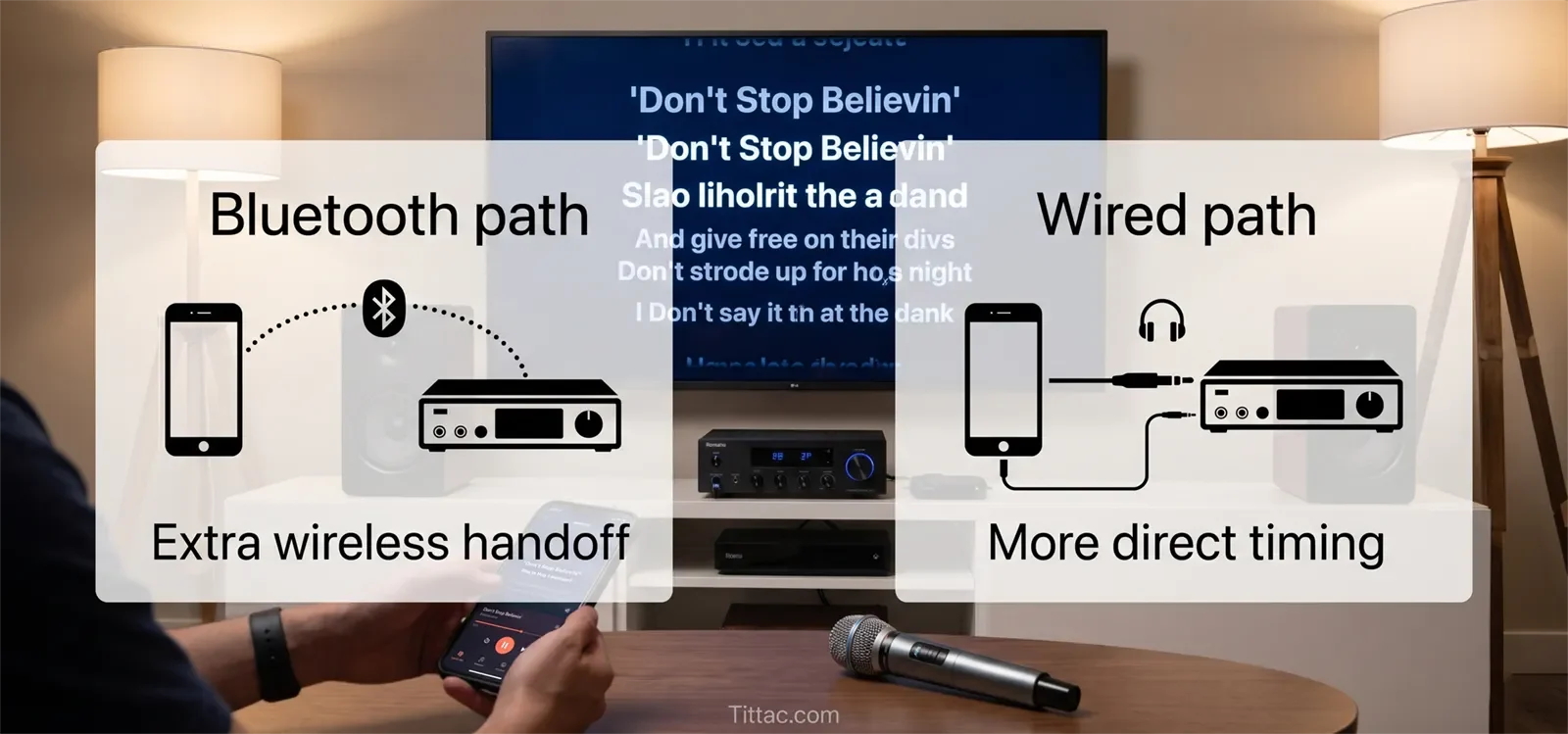
Bluetooth can be convenient, but it is often a weak choice for the main karaoke audio return. If the audio already passes through a TV or streaming device, then gets sent again by Bluetooth, the timing can feel less natural.
The Signal Path Is Too Long
If the source goes through several stages before reaching the speakers, each stage can add a little delay. Karaoke usually works better when the audio route is shorter and more direct.
Too Many Devices Are Sharing Control
Some setups ask the TV, source device, Bluetooth connection, karaoke unit, and speaker to all handle part of the sound. That creates a confusing chain. The more handoffs the signal makes, the harder it is to keep timing tight.
The Playback Device or App Is Contributing
Sometimes users blame Bluetooth when the source device or streaming method is also part of the delay. If your karaoke setup depends heavily on YouTube or app-based playback, review Best Streaming Devices for YouTube Karaoke.
Heavy Echo Is Being Mistaken for Delay
Too much echo or reverb can make the voice feel behind even if the music path is not dramatically late. If the timing problem seems connected to the microphone sound more than the music, the vocal effect settings may need attention.
The practical takeaway is simple: delay usually enters where the path becomes longer, more wireless, or more processed. The best fix is often removing one unnecessary layer at a time.
Step-by-Step Fix Order
The fastest way to reduce Bluetooth audio delay is to troubleshoot in a fixed order. This keeps the test clean and makes it easier to hear which change actually helped.
1. Simplify the Session
Use one song source, one screen, one microphone, and one main audio output. Do not test while switching apps, remotes, inputs, and audio destinations. A cleaner starting point gives you a more trustworthy result.
2. Identify Where Bluetooth Sits in the Chain
Ask one clear question: where is Bluetooth being used?
- Between the phone and speaker?
- Between the TV and karaoke system?
- Between the TV and portable speaker?
- Between another source device and the audio system?
You cannot fix timing well until you know exactly which part of the path is wireless.
3. Remove One Wireless Step First
If the TV is sending audio onward by Bluetooth, that is usually the first step to remove. TV-to-speaker Bluetooth is convenient, but it often creates noticeable lag for karaoke.
If the source is already wireless and the TV is also handing audio off wirelessly, the chain is doing too much. For many TV-based setups, a cleaner wired TV-to-karaoke path helps immediately. Use How to Connect a Karaoke System to a Smart TV if you need the TV connection path rebuilt more clearly.
4. Compare the Same Source Through a Wired Path
Do not change everything at once. Keep the same song source and route the audio through the most direct wired path available. If the performance feels more natural, the delay is path-related, not imagined.
5. Reduce TV Audio Processing
If your TV has extra sound modes, lip-sync adjustment, surround processing, or audio enhancement, simplify those settings. The goal is not richer TV sound. The goal is more immediate karaoke timing.
6. Keep One Device in Charge of the Karaoke Audio Path
Karaoke gets harder to control when the TV, source device, karaoke unit, and speaker all compete to manage the same signal. A cleaner setup gives each device one clear job and avoids unnecessary handoffs.
7. Retest With Real Singing
A setup can sound acceptable when no one is singing and still feel late when a real vocal starts. Always judge the fix while actually singing. Karaoke timing cannot be tested by casual listening alone.
8. Switch the Critical Path to Wired If Lag Remains Obvious
If the beat still feels late or the singer keeps adjusting awkwardly, Bluetooth is no longer serving the setup well. At that point, the better long-term answer is usually a more direct connection path rather than more tweaking.
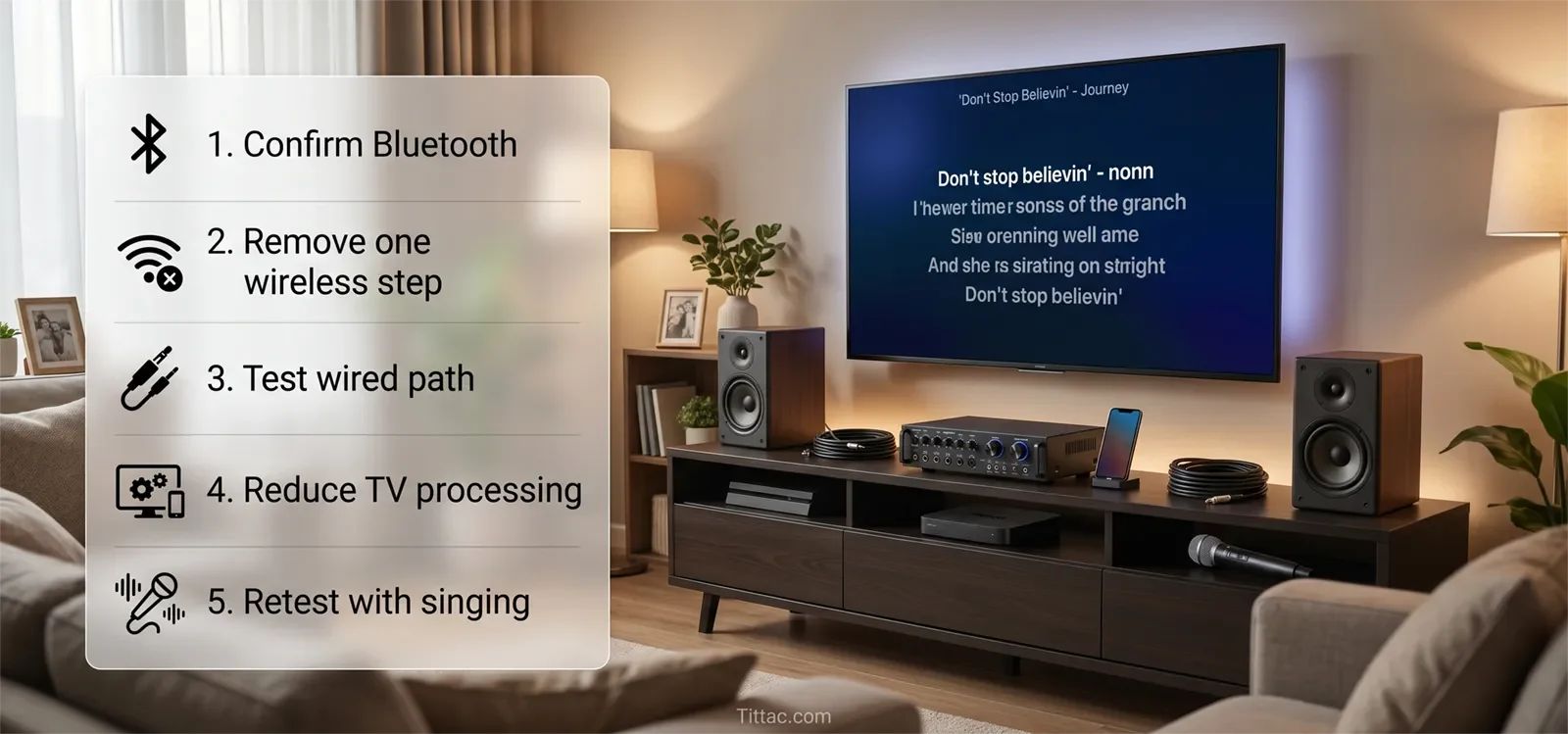
This order works because it protects timing, clarity, and repeatability. Families need the setup to work the same way every time, not only after a long troubleshooting session.
Best Connection Path for Lower Delay
For lower karaoke delay, the best path is usually the shortest practical wired path between the source, karaoke control point, and speakers.
A cleaner home karaoke path usually follows this logic:
- Screen: TV displays lyrics and video.
- Source: Smart TV app, streaming device, phone, tablet, or karaoke player provides the song.
- Karaoke control point: Mixer, amplifier, karaoke speaker, or karaoke system manages microphones and music together.
- Speakers: Play one final mixed output into the room.
The weaker pattern is when the TV sends audio by Bluetooth to one device, microphones enter somewhere else, and the speaker system is trying to combine signals that did not arrive together. That may work for casual listening, but it often feels late or disconnected for karaoke.
For most home users, the safest rule is this: use Bluetooth for convenience only when timing is still comfortable. If timing matters, keep the main karaoke audio path wired and direct.
When the Problem Is Actually Somewhere Else
Not every timing complaint in karaoke is caused by Bluetooth. Sometimes Bluetooth is present, but another issue is doing most of the damage.
One common example is too much vocal effect. If the microphone sound is heavily smeared by echo or reverb, the singer may describe that as lag even when the music path is not dramatically late.
Another example is a TV-centered setup that already has routing confusion. In that case, Bluetooth may only make a messy chain more obvious rather than creating the entire problem by itself.
The source device can also be the issue. If the setup feels fine with one app but noticeably worse with another, the speaker or microphone may not be the main problem. The playback method may be less responsive.
There are also cases where the user hears two versions of the same experience: a direct room sound and a processed return that reaches the speakers later. That creates a disconnected feeling even if no single device appears broken.
If your TV-based karaoke still feels awkward after reducing Bluetooth steps, rebuild the connection path in a cleaner order. That usually reveals whether the delay is coming from the TV route itself or from a broader setup problem.
See How to Connect a Karaoke System to a Smart TV
Conclusion
Bluetooth audio delay in karaoke becomes easier to solve when you treat it as a signal-path problem. The best results usually come from identifying where the lag enters, removing unnecessary wireless handoffs, simplifying TV processing, and comparing the same session through a wired path.
The better karaoke setup is the one that feels immediate, stable, and easy to repeat. A good signal path should help the singer stay on beat, start confidently, and avoid awkward timing compensation.
If Bluetooth keeps making the session feel late, disconnected, or unreliable, it is usually better to simplify the path than to force convenience into the main karaoke chain.
Frequently Asked Questions
Is Bluetooth always bad for karaoke?
No. Bluetooth can be fine for casual use if the delay is not noticeable. But it is often a weaker choice for the main karaoke audio path because singing is more timing-sensitive than casual music listening.
Why does karaoke delay feel worse on a TV setup?
TV-based karaoke often adds processing before sound reaches the speakers. Even when the picture looks normal, the audio may be taking a slower path than expected. Karaoke exposes that quickly because the singer is trying to stay in time with the beat and lyrics.
Can changing TV sound settings fix Bluetooth delay?
Sometimes settings help, but they do not solve every timing problem. If the signal path is long and wireless, menu changes may only reduce the symptom slightly. Removing a wireless step usually makes a bigger difference.
Should I replace my microphone to fix Bluetooth karaoke lag?
Usually not. If the beat and singing feel out of sync, the issue is more likely in the playback path than the microphone itself. Check the TV, source route, Bluetooth handoff, and audio output path first.
Is a wired connection better for karaoke timing?
In most homes, yes. A wired connection usually gives a more direct and predictable audio path, which helps singers stay in time more easily.
Why does my karaoke sound delayed only with some apps?
Different apps and devices can process audio differently. If one app feels worse than another, the delay may be connected to the playback method, not only the speaker or microphone system.










