
For most home karaoke setups, optical is the safer default when you want a simple, predictable TV-audio path into the karaoke system. HDMI ARC or eARC can be better when your TV and karaoke system support it cleanly, but the best choice is the connection that gives your room stable music, easy routing, and the least delay when people are actually singing.
Who this guide is for: Home users choosing between HDMI and optical for TV-based karaoke who want a practical answer, not a technical home-theater lecture.
How this guide was prepared: This article was rebuilt as a karaoke setup decision guide. It focuses on real home use: TV audio routing, delay, compatibility, simplicity, and whether the setup stays easy to repeat when family or guests want to sing.
HDMI and optical can both send TV audio into a karaoke system, but they do not always behave the same in a real living room. Movies and regular TV watching can hide small connection problems. Karaoke does not. When the music feels delayed, the TV audio changes unexpectedly, or the karaoke system is listening to the wrong input, the whole experience becomes frustrating fast.
The main question is not “which cable is newer?” The better question is: which connection gives your home the cleanest path from the smart TV into the karaoke system? If you want the full setup order before choosing a cable, start with the Step-by-Step Home Karaoke Setup Guide.
Table of Contents
Quick comparison: HDMI vs optical for karaoke
For karaoke, optical usually wins on simplicity. HDMI usually wins on integration when the equipment supports ARC or eARC properly. Both can work, but they solve slightly different problems.
| Connection | Best for | Main advantage | Main risk |
|---|---|---|---|
| Optical | Simple TV-to-karaoke audio | Predictable, audio-only routing | May require TV audio format settings, often PCM |
| HDMI ARC/eARC | TV-centered entertainment setups | Cleaner integration with the TV system | Can create ARC, input, or compatibility confusion |
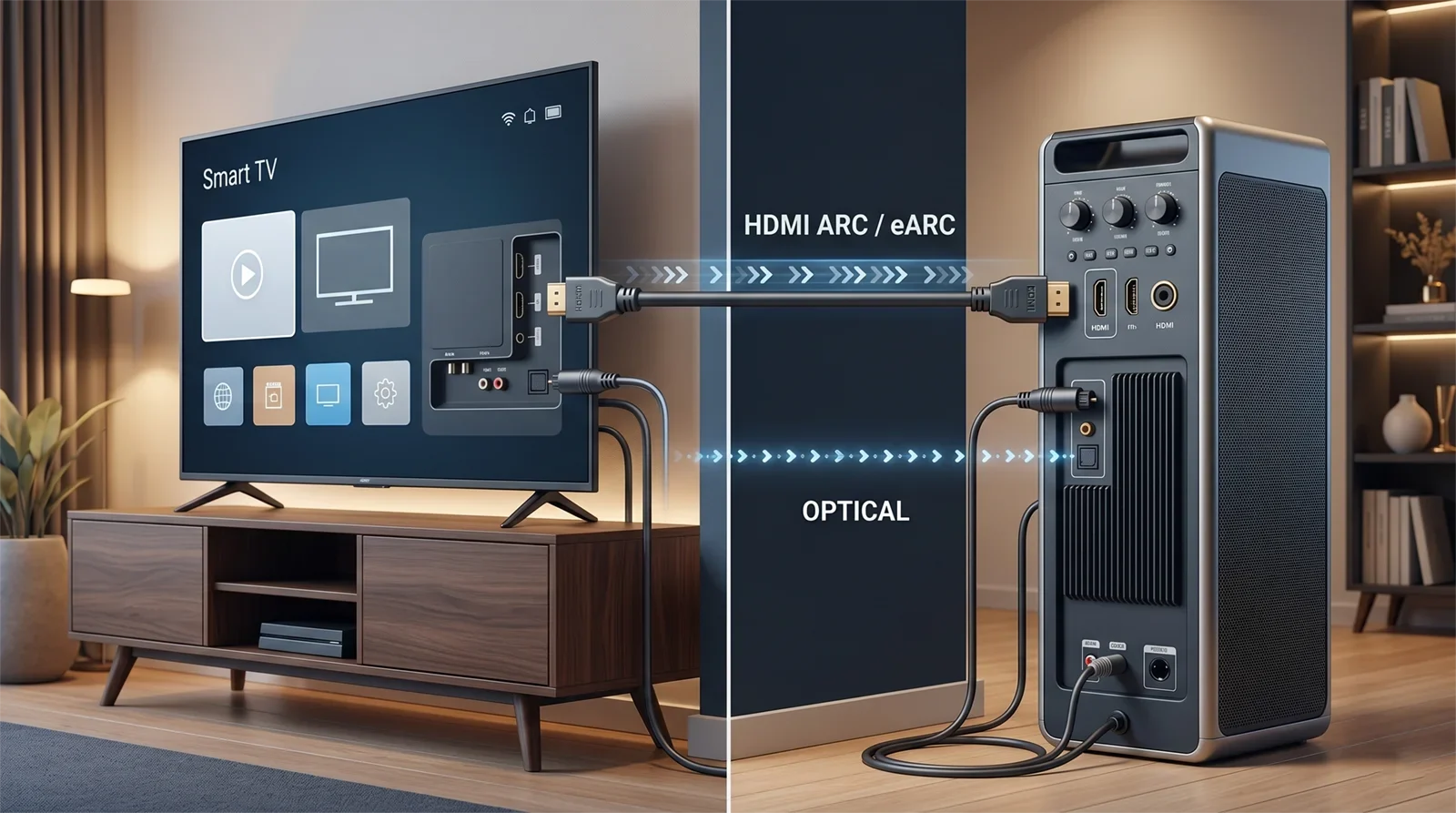
If your household wants the easiest repeatable setup, optical is often the better starting point. If your room already runs smoothly through HDMI ARC or eARC and the karaoke system supports it, HDMI can be the cleaner long-term choice.
What HDMI is best for
HDMI makes the most sense when your karaoke setup is built around the TV as the center of the room and your equipment handles ARC or eARC reliably. In that kind of setup, HDMI can make the room feel cleaner because the TV, audio system, and regular media use all follow one connected routine.
HDMI is usually the better fit when:
- Your TV and karaoke-side audio device both clearly support HDMI ARC or eARC.
- Your karaoke setup is permanent rather than moved around often.
- You want the TV to stay the main hub for both regular entertainment and karaoke.
- You prefer fewer visible cables.
- Your system already switches sources smoothly without confusing the household.
The important word is “support.” A regular HDMI port does not always mean the device can receive TV audio through ARC. If the karaoke amplifier, mixer, or speaker is not designed for that, HDMI may create more confusion than benefit.
What optical is best for
Optical makes the most sense when you want a direct, audio-only path from the TV into the karaoke system. For many homes, that is exactly what karaoke needs: stable music playback from the TV, microphone control on the karaoke system, and fewer settings to explain to everyone else in the house.
Optical is usually the better fit when:
- You mainly need a clean stereo music feed from the TV.
- Your karaoke system has a dependable optical input.
- You want easier troubleshooting.
- Your household prefers a setup that is simple to repeat.
- You do not want the setup to depend on HDMI ARC behavior.
Optical is not outdated for karaoke just because HDMI sounds more modern. In many family setups, optical works well because it does one job clearly: it sends TV audio to the karaoke system. That simple role is valuable when the goal is singing, not building a complex home theater.
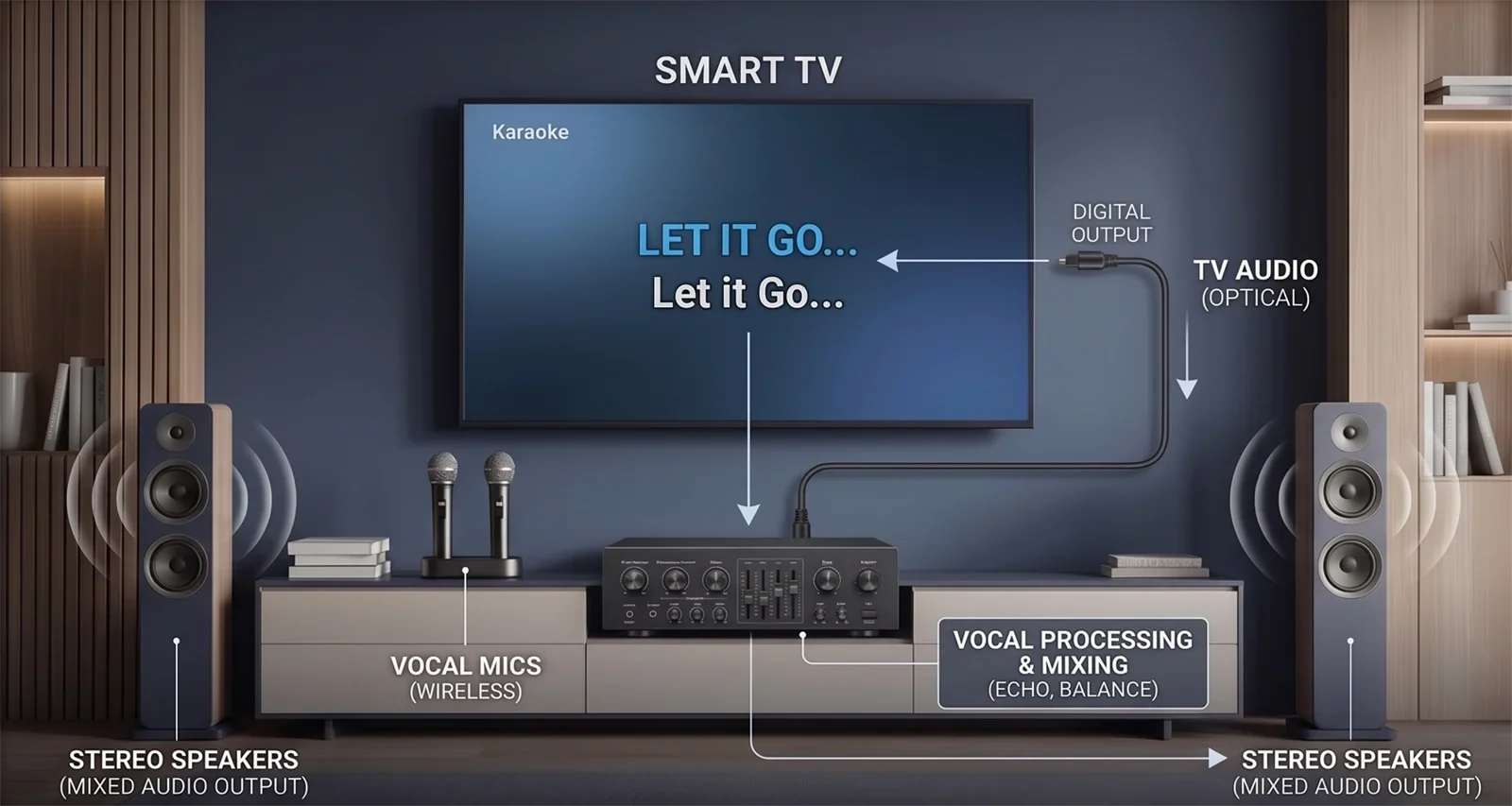
This is why many TV-and-YouTube karaoke rooms still work very well with optical. The TV handles the lyrics and source playback, while the karaoke system handles the microphones, echo, vocal balance, and final sound. That same logic is used in Karaoke Setup for TV + YouTube + Wireless Microphones.
Delay, compatibility, and routing differences
Delay is the issue most people notice first in karaoke. If the music feels late, the voice feels disconnected, or the singer cannot follow the song naturally, the connection is not doing its job well enough.
Delay is not only caused by the cable
Many people ask whether HDMI or optical has less delay. In real home karaoke, delay depends on the full signal chain: the TV, the audio output format, any sound processing, the karaoke unit, the speakers, and sometimes the app or source device.
HDMI can feel excellent in one room and frustrating in another. Optical can feel smooth in one setup and only average in the next. The correct test is not theory. The correct test is whether the singer feels naturally connected to the music.
Compatibility matters more than novelty
A newer-feeling connection is not automatically the better connection. HDMI ARC or eARC can be excellent when everything supports it cleanly. But if the TV keeps changing audio behavior, the input switching is confusing, or the karaoke device does not handle ARC well, HDMI can become fragile.
Optical often wins because it is simpler. It does not try to control the room. It simply sends audio. For many home karaoke setups, that limited job is a strength.
Routing clarity is a real advantage
Karaoke works best when the music enters the karaoke system clearly and the microphones stay controlled inside that same system. Once the TV audio path becomes hard to follow, troubleshooting becomes harder too.
If you are already dealing with weak sound, strange timing, or unstable TV audio behavior, use a clean fix order instead of changing everything at once. The best next step is Common Karaoke Problems and How to Fix Them.
A good connection should disappear into the background once the song starts. If someone has to think about the cable, the input, or the TV menu every time, the setup is probably more complicated than it needs to be.
Which option is better for most homes?
For most homes, optical is the better default starting point. That does not mean HDMI is bad. It means optical often matches the real needs of home karaoke more directly.
Most home karaoke setups need:
- Stable music playback from the TV
- Clear routing into the karaoke system
- Easy troubleshooting
- Predictable daily use
- Less confusion when different family members use the system
Optical often fits those needs because it gives you a direct TV-audio path that is easy to isolate and test. If the TV audio reaches the karaoke system cleanly and the microphones are controlled by the karaoke unit, many homes already have what they need.
This is especially true for living-room karaoke, YouTube karaoke, family gatherings, and casual weekend singing. In those rooms, reliability matters more than a connection that sounds more advanced on paper.
Use this rule: start with optical when your priority is simple and reliable TV audio. Use HDMI when your system clearly supports ARC or eARC and the room feels smoother with a TV-centered setup.
Simple decision checklist
Start with optical if most of these are true
- You want the simplest TV-audio path into the karaoke system.
- You mainly care about stable stereo music for karaoke.
- Your karaoke system has a clear optical input.
- You want easier troubleshooting.
- Your family needs a setup that is easy to repeat.
- HDMI ARC has already felt confusing or unreliable in your room.
Start with HDMI if most of these are true
- Your TV and karaoke system both support ARC or eARC clearly.
- Your room already revolves around the TV as the main hub.
- You want cleaner day-to-day integration.
- You have already tested HDMI and it stays stable.
- Your setup is permanent and you want less cable clutter.
- You are comfortable checking TV sound menus and input behavior.
Choose based on real singing comfort
After connecting either path, test a real karaoke song. Do not judge only by whether sound comes out. Listen for comfort.
- Does the music feel natural to sing with?
- Does the setup stay stable when you switch from regular TV use to karaoke?
- Can someone else in the house repeat the setup without confusion?
- Can you adjust music and microphone levels from the karaoke side?
If one connection clearly wins on clarity, stability, lower perceived delay, and easier daily use, that is the better connection for your home.
Frequently Asked Questions
Is HDMI always better than optical for karaoke?
No. HDMI can be excellent when ARC or eARC works reliably, but optical is often better for home karaoke when you want a simpler, more predictable music path into the karaoke system.
Is optical still good for YouTube karaoke?
Yes. YouTube karaoke usually needs clean, stable stereo playback more than complex home-theater audio behavior. In many homes, optical is still one of the easiest ways to send TV audio into a karaoke system.
Which connection has less delay for karaoke?
Neither connection wins in every room. Delay depends on the TV, audio format, sound processing, karaoke system, and speaker path. Test HDMI and optical one at a time, then keep the connection that feels most natural when singing.
Should microphones connect to the TV when I use HDMI or optical?
No. In most home karaoke setups, microphones should connect to the karaoke mixer, amplifier, or karaoke speaker. The TV should handle content and lyrics, while the karaoke system handles vocals, echo, balance, and final output.
Why does optical work but HDMI ARC does not?
HDMI ARC depends on support from both devices and can involve TV settings, input labels, control behavior, and audio format compatibility. Optical is usually simpler because it only sends audio from the TV to the karaoke system.
If you have chosen between HDMI and optical, the next step is wiring the TV audio path cleanly so the karaoke system receives the signal without confusion.










